Using Colors
Changing color
TurtleThread supports using custom colors. Do note that for each different color, a separate thread has to be used — therefore, it is not feasible to make color gradients, and color switches should be used sparingly.
The default or initial colour a turtle uses corresponds to the thread the machine starts connected to. This can be changed by setting color="<color_name>" as a parameter when initializing the turtle.
To add a command for the turtle to switch to another color, use te.color("<color_name>")
Note that te.fast_visualise() with skip=False will fail to show colour changes.
Exporting color files
Currently, TurtleThread supports exporting colours to the following file formats:
.inf (Bernina machines)
To export a color file, the saving command should be:
te.save('filename.exp', 'filename.inf')
The second argument in te.save(), which is optional, can be used to specify the color file name.
Demo
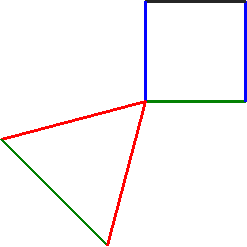
 1import turtlethread
 2
 3te = turtlethread.Turtle()
 4
 5for color in ['green', 'blue', 'black', 'blue']:
 6    te.color(color)
 7    with te.running_stitch(9999):
 8        te.forward(100)
 9    te.right(90)
10
11te.right(195)
12
13for color in ['red', 'green', 'red']:
14    te.color(color)
15    with te.running_stitch(9999):
16        te.forward(150)
17        te.right(120)
18
19
20print(te.pattern.to_pyembroidery().threadlist)
21
22
23
24te.save('test_color.exp', 'test_color.inf')
25te.save('test_color.png')
Output:
[EmbThread(thread='#008000'), EmbThread(thread='#0000ff'), EmbThread(thread='#000000'), EmbThread(thread='#0000ff'), EmbThread(thread='#ff0000'), EmbThread(thread='#008000'), EmbThread(thread='#ff0000')]
Saved files:
test_color.exp
test_color.inf
test_color.png